
First step is determine what type of correction needs to be made
What is a Type-1 1099 Correction? |
What is a Type-2 1099 Correction? |
What is a W-2C (W-2 Correction)? |
|---|---|---|
| If a form was submitted with an incorrect dollar amount, payee name, entered money in the wrong box, or the form should not have been filed.
This is a Type-1 1099 Correction. This type of correction takes 1 form to correct the problem. |
If a form was submitted with an incorrect TAX ID, or if both the name and addresses were wrong.
This is a Type-2 1099 Correction. One will be a correction form that will un-file the original. The second will not be a correction form, but rather what should have been reported originally. |
Form W-2C is used to make corrections on W-2s previously reported.
The form is used to make any and all corrections on previously reported W-2s from current or past years. For instructions on W-2C’s General Instructions for Forms W-2 (W-2C) & W-3
|
Please be aware that prior to the tax year 2020, the 1099-NEC form did not exist. Thus, if creating a correction file prior to 2020, the use of the 1099-MISC form is required.
Type-1 Correction
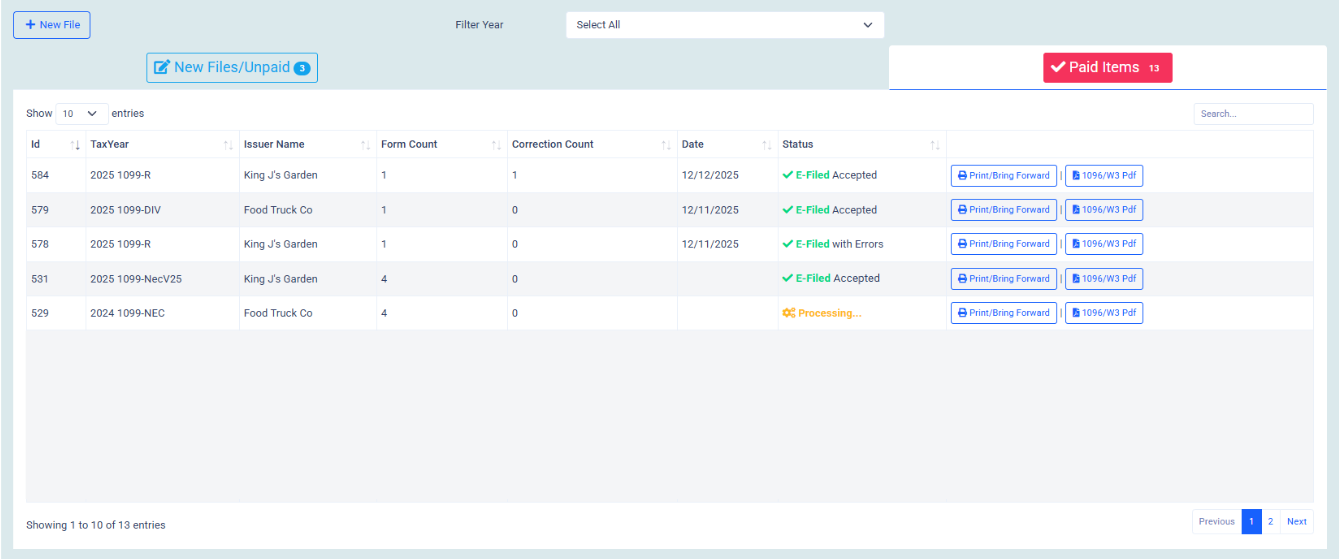
If a File that was submitted within the most current year needs to be corrected, Then Click on the Paid Items tab and navigate to the file that needs to be corrected. Click the print / bring forward button to the far right of the file name.
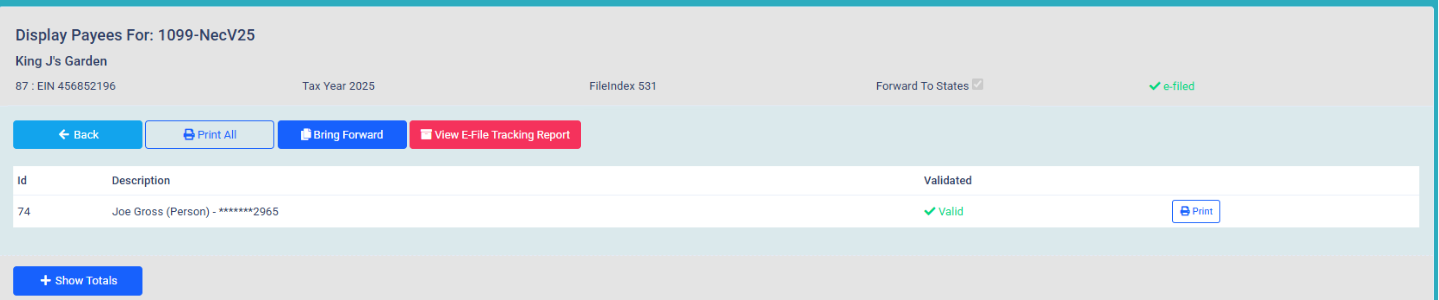
A Display Payees page will open. Click on the Blue Bring Forward Button.
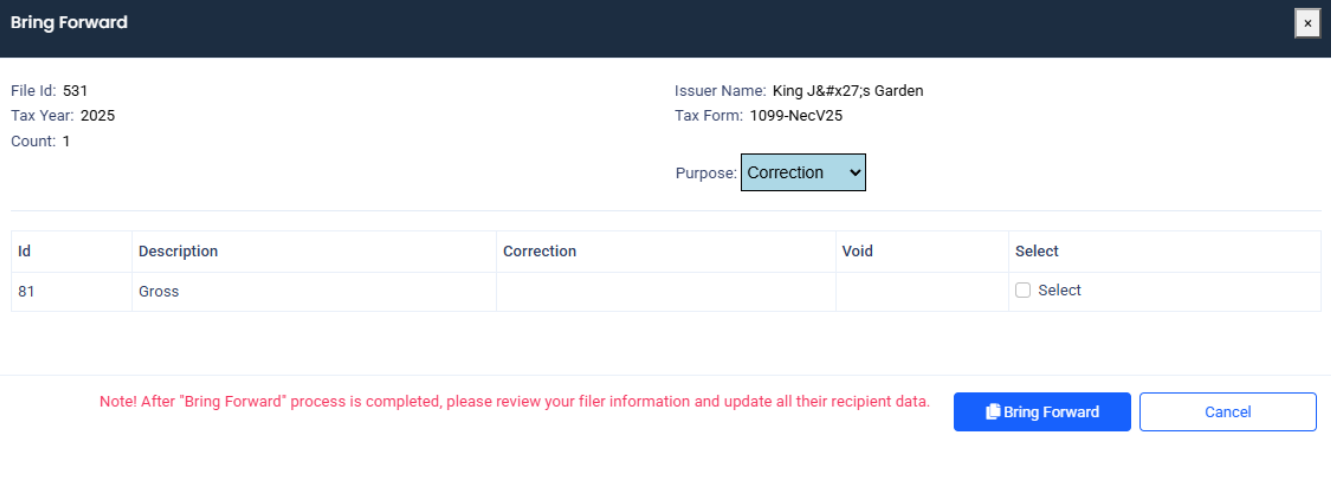
The Bring forward data entry window will open and list all the recipients in the file. Click the select button on the recipients who need to be corrected. Once all recipients have been selected, click Bring forward.
A new file will be created under the new file / unpaid tab. Please make any necessary corrections and resubmit the file for e-Filing.

*Please note a file must be brought forward to make a correction. The new filing platform IRIS requires a Submission ID that is tied to the original submission. The submission ID can only be obtained from bringing the file forward.
Type-2 Correction
*Please follow the same steps for a Type 1 correction. A type 2 correction only applies when an incorrect form type was submitted. The incorrect form type must be zeroed out, and a new original form must be filed.
Once you bring the file forward, it will create a new file under the new file / unpaid tab.
Under that New file / unpaid tab click on edit file. The Display Payees page will open. Click on the blue edit button.
The form will open. Please check the correction box, make the money amount 0.00 and save. Validate the form and move to cart and pay.
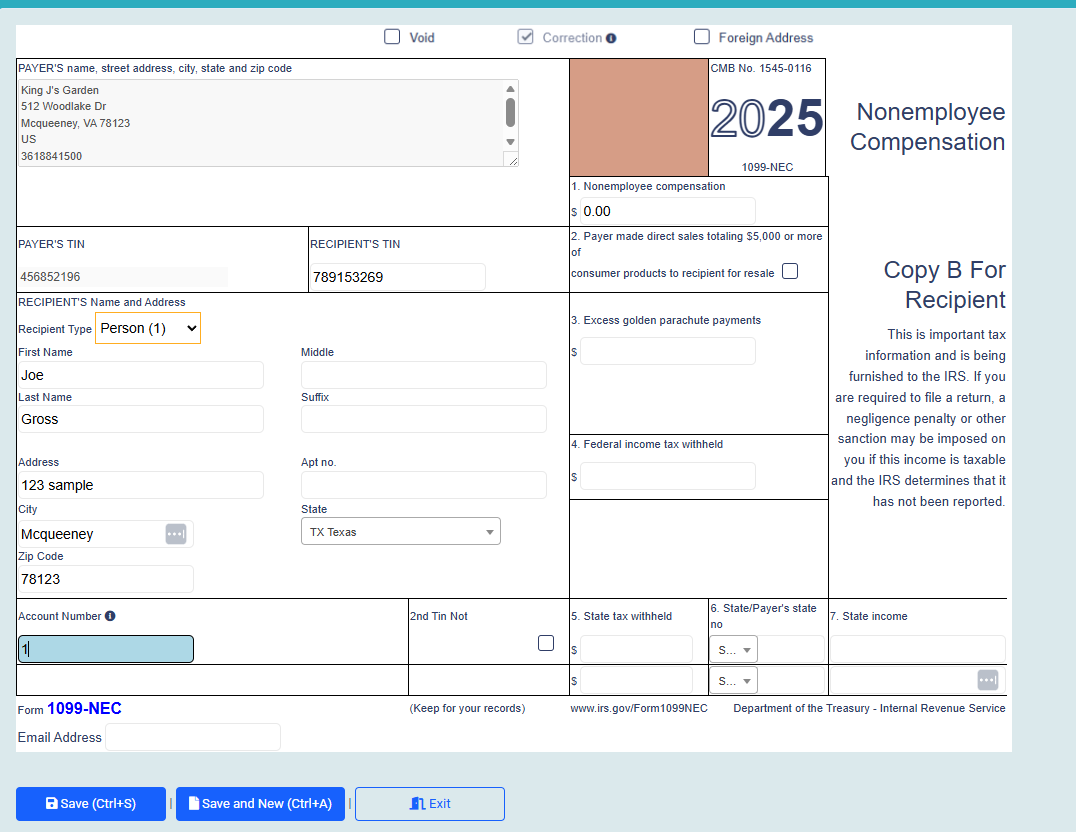
Once this step is completed, a new file will need to be created for the correct form.
*Please note that the new file does not need to have the correction box marked, it will be an original file.
If a file has been moved to the Processing or e-Filed / All Years page, with incorrect Issuer information, it will be necessary to write the IRS regarding the error(s) with the Issuer information.
For full instructions on correcting incorrect Issuer information, check the link below:
General Instructions for Information Returns 2024 II pg. 8 – 9
Please be sure to always double check the recipients information and validate your file before checking out.
Any mistakes on a W-2 form can be rectified by submitting a W-2C form.
For Further Instructions On Form W2 – C, please follow the link below: