
1099-DA Digital Asset Proceeds From Broker
(1099-DA)

File Current Year 1099-DA
Ready to start filing your 1099- DA forms?
Skip the forms and software and file to the IRS using our online services. Simply create an account, enter your 1099- DA data online, then instantly print IRS approved copies on plain paper or save as PDF copies. Our team will e-File to the IRS for you.
Before you get started filing, here is some basic information:
What Is a 1099-DA?
Form 1099-DA is an information return used by digital asset brokers to report gross proceeds and, where applicable, adjusted basis from the sale, exchange, or disposition of digital assets.
What it covers: Transactions involving digital assets, which the IRS defines as any digital representation of value that is recorded on a cryptographically secured distributed ledger (such as a blockchain). This includes cryptocurrencies, stablecoins, and tokenized assets like non-fungible tokens (NFTs).
Do I Need To Issue A 1099-DA?
Brokers must issue a 1099-DA when specific transaction conditions are met.
Who must file: Any person or platform acting as a digital asset broker that, in the ordinary course of a trade or business, stands ready to effect sales to be made by others. This includes hosted wallet providers, digital asset trading platforms, and payment processors.
The Thresholds: Unlike traditional flat annual thresholds, a 1099-DA is generally required for each separate sale or exchange of digital assets.
De Minimis Exemptions: For Processors of Digital Asset Payments (PDAPs), reporting is not required for transactions where the gross proceeds are $600 or less. Additionally, specific exemptions apply to qualifying stablecoin sales under $10,000 and specified NFTs under $600.
Key Deadlines: The broker must furnish Copy B of the statement to the recipient by February 15 of the year following the calendar year of the transaction (or the next business day if it falls on a weekend).
Official publication link – IRS 1099-DA Instructions
Past Year Forms & Cost Basis Tracking
Form 1099-DA reporting requirements officially began for transactions occurring on or after January 1, 2025. There are no older historical versions of Form 1099-DA.
The Basis Phase-In: For transactions occurring in 2025, brokers were only mandated to report gross proceeds. Cost basis reporting was voluntary. For transactions occurring in 2026 and onward, reporting the adjusted basis and the date of acquisition becomes mandatory for “covered” digital assets—meaning assets acquired in the customer’s account at that specific broker on or after January 1, 2025.
Mandatory Electronic Filing: Under general IRS information return rules, if a broker files 10 or more returns of any type across a calendar year, they are required to submit their 1099-DA forms electronically via the IRS FIRE or IRIS systems.
1099-DA Form
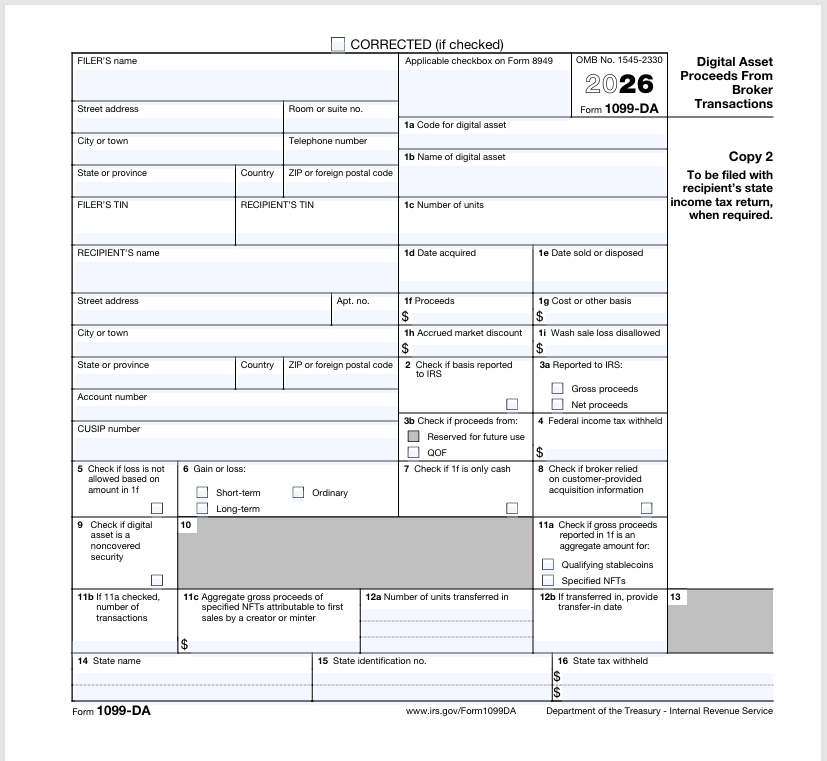
WageFiling provides easy solutions for creating and filing corrections for 1099-DA Forms. If your company needs to make any corrections, we have you covered!
Take a look at the common errors below to identify which type of error was made, and how to correct. You can file corrections through us even if you filed in the past or with another company.
There Are 2 Common Error Types
Type 1 and Type 2 as defined by the IRS. Let’s determine what type of correction you need to file.
Type 1 Errors (Incorrect Money Amounts, Dates, or Asset Descriptions): If an error was made regarding the gross proceeds, cost basis, transaction date, or the specific type/quantity of the digital asset, only one form is needed to fix it. Prepare a new Form 1099-DA, place an “X” in the CORRECTED checkbox at the top, and fill in the entirely accurate transaction details. This data completely overrides the original submission.
Type 2 Errors (Incorrect Recipient Name, TIN, or Account Number): If the broker accidentally entered the wrong Taxpayer Identification Number (TIN/SSN/EIN) or name for the recipient, a two-step process is mandatory.
Step 1: File a Form 1099-DA checking the CORRECTED box. Duplicate the exact incorrect name and TIN originally submitted but input $0.00 for the gross proceeds. This effectively cancels the transaction record under that incorrect identity.
Step 2: File a separate, brand-new Form 1099-DA as an original submission (do not check the corrected box) containing the fully accurate recipient name, correct TIN, and actual transaction details.
Once you know what type of error you need to correct, our program makes it easy!
Ready to get started?
We Make It Easy For Anyone To File 1099-DA, 1099-NEC, 1099-MISC, and W-2 Forms

WageFiling is the only filing service with a Quality Supplier rating from the IRS since 1996.
Address
WAGE FILING © 2025 | All Rights
Reserved
– The Payee is the person, estate, trust, or other entity who received the money. The payee is also sometimes called the recipient or employee.
– e-Filing or electronic filing, means sending a copy of Form 1099 or W-2 to the IRS in a formless way using electronic transfer. Transmittal Forms 1096 or W-3 is never needed when e-Filing.